
Online meetings have become an essential part of modern business. Whether you work remotely, manage an international team, run an online business, attend client meetings, or communicate with customers, clear audio and accurate meeting notes can make a significant difference in your productivity.
However, online communication still comes with several common problems. Background noise, keyboard typing, traffic, people talking nearby, poor microphone quality, and distracting environmental sounds can make conversations difficult to follow. Another challenge is keeping track of everything discussed during meetings. Important decisions, follow-up tasks, and business opportunities can easily get lost when you are busy listening and participating.
This is where AI-powered productivity tools can help.
Krisp is a voice AI platform designed to improve communication through intelligent noise cancellation, meeting transcription, AI-generated notes, and other voice-related technologies. Instead of simply providing another meeting application, Krisp works alongside many of the communication tools people already use.
But is Krisp actually worth using in 2026? How effective are its features? Does it offer enough value for individuals and businesses? And is it a good investment compared with other AI productivity solutions?
In this detailed Krisp AI review, we will examine its main features, functionality, pricing considerations, advantages, limitations, supported use cases, and potential alternatives. We will also explain who can benefit most from the platform.
Ready to explore Krisp? Try Krisp AI here – Get Started.
1. What Is Krisp AI?
Krisp is an AI-powered voice technology platform that helps people communicate more clearly and work more efficiently during online conversations.
Originally recognized for its AI noise cancellation technology, Krisp has expanded into a broader voice AI ecosystem. Its products now cover several areas, including AI meeting assistance, contact center automation, accent conversion, voice translation, and developer-focused voice AI technology.
For everyday professionals, the most relevant product is Krisp AI Meeting Assistant.
This solution combines several useful capabilities into one application:
- AI-powered background noise cancellation.
- Real-time audio enhancement.
- Meeting recording.
- Automatic meeting transcription.
- AI-generated meeting summaries.
- Action item extraction.
- AI-powered meeting chat.
- Accent conversion.
- Meeting organization and collaboration features.
One of the most interesting aspects of Krisp is that it is designed to work with existing communication applications rather than requiring users to move every conversation into a new meeting platform.
It supports workflows involving popular services such as Zoom, Google Meet, Microsoft Teams, and Slack Huddles, among other calling applications.
This makes it particularly useful for professionals who regularly switch between different communication platforms.
For example, a remote employee might use Google Meet for internal meetings, Zoom for client presentations, and Microsoft Teams for communication with another department. Instead of maintaining separate audio enhancement and note-taking workflows, Krisp can provide a consistent experience across supported applications.
Another important distinction is that Krisp is not just an AI meeting transcription tool. Its noise cancellation technology addresses the audio quality problem before meeting notes and transcripts are even considered.
Want to improve your online meetings? Visit Krisp’s official website and explore its features.
2. How Does Krisp AI Work?
Krisp operates as an audio processing layer between your computer’s microphone, speakers, and communication applications.
After installing the desktop application, users can select Krisp Microphone and Krisp Speaker as their audio devices within compatible meeting software.
When enabled, Krisp processes audio to reduce unwanted background sounds and improve voice clarity.
For example, imagine attending an important business meeting while working from a home office. Someone is talking in another room, your keyboard is making noise, and traffic can be heard outside.
Without noise cancellation, these sounds may interfere with your communication.
With Krisp enabled, its AI audio processing technology helps filter unwanted background sounds so that other meeting participants can hear your voice more clearly.
Krisp also offers AI meeting assistance. Depending on the selected recording and note-taking settings, it can capture meeting content, generate transcripts, summarize discussions, and identify action items.
The general workflow looks like this:
- Create a Krisp account.
- Download and install the application.
- Configure your microphone and speaker.
- Connect or select your preferred meeting application.
- Enable the desired noise cancellation settings.
- Configure the AI Note Taker.
- Start your meeting and review the resulting notes and transcript.
The key advantage is convenience. Users can continue working with familiar communication platforms while adding AI-powered audio and meeting productivity features.
Get started with Krisp and simplify your meeting workflow: Create your Krisp account.
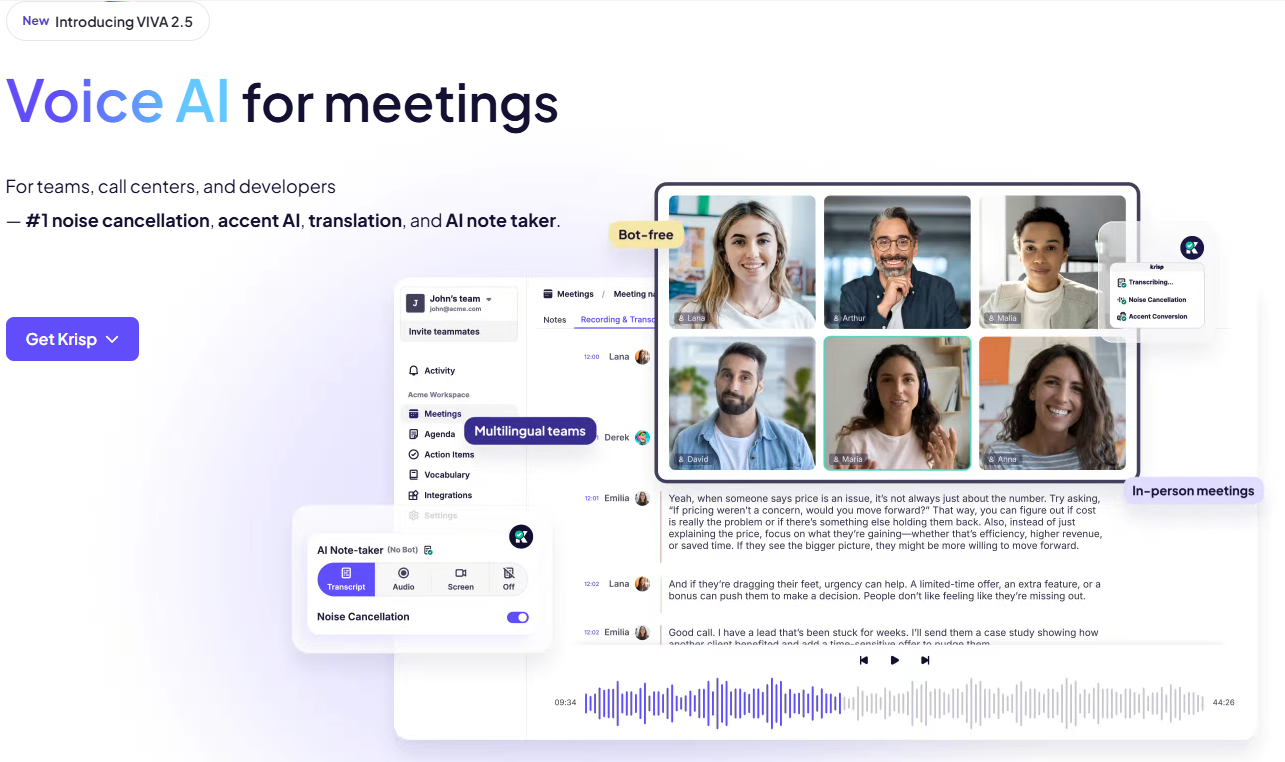
3. Krisp AI Features: What Do You Actually Get?
Krisp offers several features that address different communication and productivity challenges. Below is a closer look at the most important capabilities.
3.1. AI Noise Cancellation
Noise cancellation is one of the main reasons Krisp became popular.
Background noise can make online meetings frustrating, especially when participants work from home, shared offices, coffee shops, or other environments that are not acoustically controlled.
Traditional noise suppression solutions may struggle when multiple sound sources are present. Krisp uses AI-powered audio processing to identify and reduce unwanted sounds while preserving the primary speaker’s voice.
Its noise cancellation capabilities cover several categories:
- Keyboard and mouse clicks.
- Traffic and outdoor noise.
- Air conditioners and fans.
- Construction sounds.
- Household appliances.
- Background conversations.
- Children and pets.
- Echo and other unwanted audio disturbances.
Krisp provides microphone noise cancellation to improve the sound transmitted from your side of the call. It also offers speaker noise cancellation to reduce unwanted sounds coming from other participants.
Voice isolation is another useful capability, particularly for people working in shared environments.
For professionals who regularly participate in customer calls, sales presentations, interviews, or online conferences, clear audio can create a more professional communication experience.
One technical advantage is that Krisp’s noise cancellation processing runs locally on the device. According to its documentation, this audio processing does not require sending the audio to external servers for noise cancellation.
Of course, the effectiveness of any audio enhancement solution can depend on microphone quality, device performance, environmental conditions, and configuration.
Want cleaner audio during your next meeting? Explore Krisp AI Noise Cancellation.
3.2. AI Meeting Transcription
Taking notes manually during meetings can be distracting.
You may need to listen carefully, participate in discussions, answer questions, and simultaneously write down important information. This can make it difficult to stay focused.
Krisp’s AI transcription feature helps address this problem by converting spoken conversations into written transcripts.
Instead of relying entirely on memory, users can review what was discussed after the meeting.
This is especially valuable for:
- Business meetings.
- Client consultations.
- Sales calls.
- Team discussions.
- Online interviews.
- Training sessions.
- Project planning meetings.
- Remote collaboration.
A searchable transcript can also make it easier to revisit specific conversations without replaying an entire recording.
For example, if a client mentions an important requirement during a 45-minute discussion, you can use the transcript to locate the relevant part of the conversation.
This can save time and reduce the risk of forgetting important details.
Krisp also provides different Note Taker recording modes, including transcript-only, audio, and video options, depending on the supported configuration and selected settings.
Users should remember that transcription accuracy can vary depending on speech clarity, accents, background noise, language support, and other recording conditions.
Stop worrying about missing important conversations. Try Krisp AI Transcription.
3.3. AI Meeting Notes and Summaries
A transcript contains everything that was said, but reading an entire conversation after every meeting is not always practical.
This is where AI-generated meeting notes become useful.
Krisp can transform meeting discussions into structured summaries containing important information and key takeaways.
Instead of manually reviewing every sentence, users can quickly understand the main topics discussed.
A typical meeting summary may help organize:
- Main discussion points.
- Important decisions.
- Key information.
- Follow-up activities.
- Responsibilities.
- Next steps.
Consider a project management meeting involving five team members.
During the discussion, the team agrees to update a landing page, prepare a new advertising campaign, review analytics, and deliver a report before Friday.
Without proper documentation, some tasks may be forgotten or misunderstood.
An AI-generated meeting summary can help capture the discussion and make the next steps easier to review.
For managers and business owners, this can improve accountability because everyone has a clearer record of what was discussed.
However, AI-generated notes should still be reviewed before being shared as official business records. Automated systems can occasionally misunderstand context or assign an incorrect interpretation to a statement.
Make your meetings more productive with AI-generated notes. Discover Krisp AI Meeting Assistant.
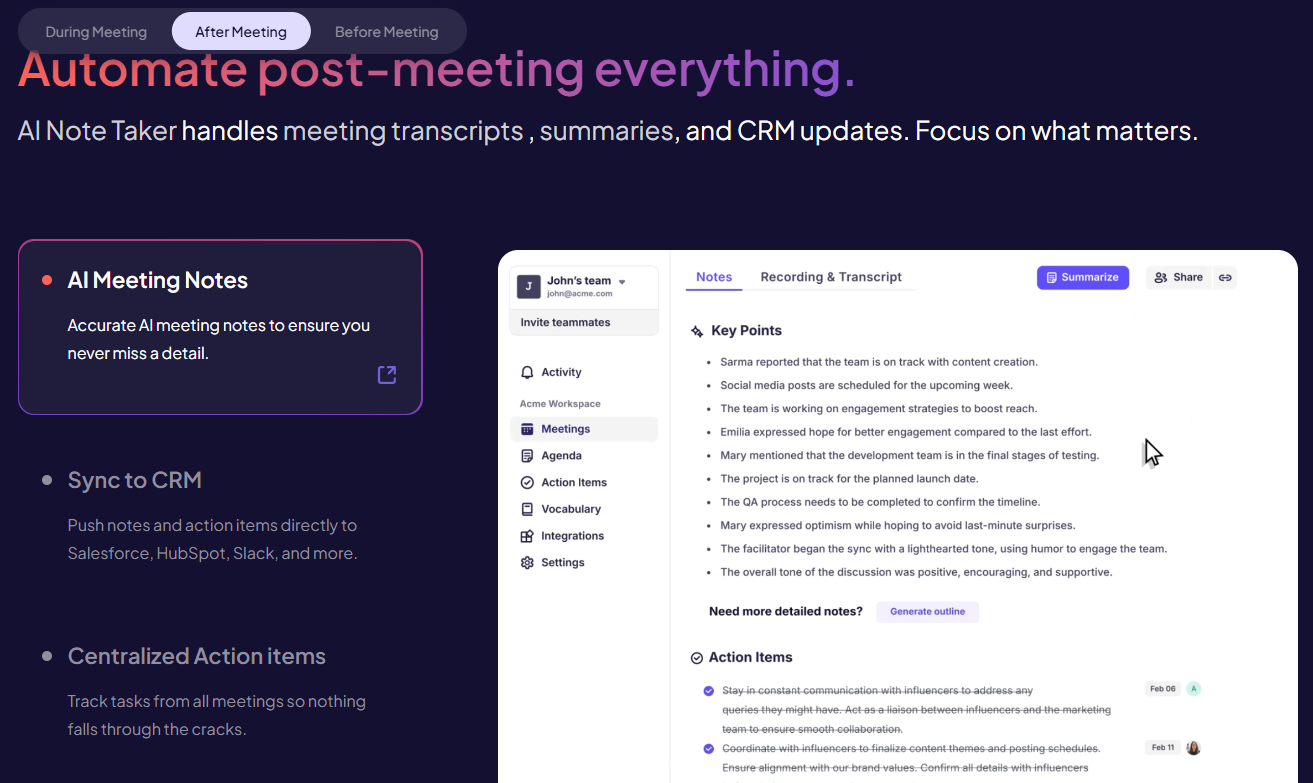
3.4. Automatic Action Item Extraction
One of the most useful aspects of an AI meeting assistant is its ability to identify tasks and follow-up activities.
Many meetings end with important commitments, but these commitments are not always documented properly.
Krisp’s AI meeting assistance can identify action items from discussions and help users keep track of what needs to happen next.
For example:
- Marketing team: Prepare campaign creatives.
- Sales team: Contact potential customers.
- Project manager: Review the delivery schedule.
- Developer: Fix reported technical issues.
- Business owner: Approve the proposed budget.
Having these tasks organized makes it easier to turn conversations into practical business activities.
This feature can be particularly valuable for teams that manage multiple projects and attend several meetings each day.
Rather than relying on individual memory, participants can refer back to meeting notes to understand their responsibilities.
It is still important to verify generated action items, especially when a discussion includes complicated deadlines, conditional commitments, or multiple people with similar responsibilities.
Turn conversations into actionable tasks. Start using Krisp AI.
3.5. AI Chat for Meetings
Another interesting capability is AI Chat.
Instead of manually searching through long transcripts, users can ask follow-up questions about meeting content.
For example:
- What were the main decisions from this meeting?
- Which tasks were assigned to the marketing team?
- What deadline did the client mention?
- What problems were discussed?
- What should we do next?
This creates a more convenient way to retrieve information from previous conversations.
For people who participate in many meetings, this can reduce the time spent searching through recordings and notes.
It also makes meeting information more accessible to team members who need specific details rather than an entire transcript.
As with other AI-generated responses, important information should be checked against the original transcript when accuracy is critical.
Explore smarter ways to review meeting information. Try Krisp AI.
3.6. AI Accent Conversion
Communication is not always easy when people speak with different accents.
This is particularly common in international business environments, where employees, customers, and partners may communicate in English despite having different native languages.
Krisp offers Accent Conversion technology designed to make spoken communication easier to understand.
The feature uses AI to modify accent characteristics in real time while maintaining the speaker’s voice.
This may help reduce communication barriers during international calls, particularly in customer-facing environments.
Potential use cases include:
- International customer support.
- Global sales teams.
- Remote employees.
- Business presentations.
- Online education.
- Cross-border collaboration.
It is important to understand that accent conversion is not the same as translation. It is designed to improve speech clarity by modifying accent characteristics, not necessarily converting spoken content into another language.
Its usefulness will depend on the speakers, supported configurations, and the specific communication environment.
Interested in clearer international communication? Explore Krisp Accent Conversion.
3.7. Meeting Recording
Sometimes, a written transcript is not enough.
You may need to review the original conversation, understand the tone of a discussion, or revisit information that was not fully captured in the meeting notes.
Krisp provides recording options through its AI Meeting Assistant.
Depending on the selected mode, users can choose between transcript-only, audio, and video recording options.
This gives professionals greater flexibility when deciding how much meeting information they want to capture.
For example, a business consultant may prefer audio recordings for client discussions, while a team conducting a presentation review may benefit from video recordings.
Recording settings should always be configured appropriately.
Before recording conversations, make sure you understand applicable privacy laws, organizational policies, and consent requirements. Participants should be informed when required.
Keep important meeting information accessible. Get started with Krisp.
3.8. Meeting Organization and Collaboration
Recording meetings is useful, but managing information becomes increasingly important as the number of conversations grows.
Krisp provides meeting organization capabilities that help users manage, share, and revisit meeting information.
This can be valuable for professionals who attend several meetings throughout the week.
Instead of relying on scattered notes and separate recording files, users can work with organized meeting information in one environment.
For teams, collaboration features can make it easier to share relevant notes and coordinate follow-up activities.
The platform also supports integrations with selected productivity and business tools, including services such as Slack, Salesforce, HubSpot, and Zapier.
The available integrations and functionality can depend on the selected plan and product configuration.
Organize your conversations more efficiently. Explore Krisp’s productivity features.
4. Who Should Use Krisp AI?
Krisp is designed for different types of users. However, its value will depend on how frequently you communicate online and which features you actually need.
Here are some of the audiences that may benefit most from the platform.
4.1. Remote Workers
Remote employees frequently participate in online meetings from home offices, shared spaces, or temporary working environments.
Background noise can affect communication quality and create unnecessary distractions.
Krisp’s noise cancellation can help improve microphone and speaker audio, while its meeting assistant can help capture important discussions.
For employees attending several meetings each day, automatic notes and transcripts may also reduce the amount of time spent documenting conversations manually.
Improve your remote working experience with Krisp AI.
4.2. Business Owners and Entrepreneurs
Business owners often need to manage customer meetings, internal discussions, sales conversations, and partnerships.
The challenge is not simply attending meetings. It is remembering decisions and making sure that important tasks are completed afterward.
Krisp can help by organizing meeting information and generating summaries and action items.
This may be particularly useful for entrepreneurs who need to stay focused on business development rather than spending hours writing meeting notes.
Make business communication more efficient. Try Krisp today.
4.3. Sales Professionals
Sales professionals spend considerable time speaking with prospects and customers.
During a sales call, important details may include customer requirements, purchasing objections, budgets, decision-making timelines, and follow-up commitments.
Krisp’s transcription and AI meeting notes can help preserve these details for later review.
For sales teams, this can support better follow-up and improve the organization of customer conversations.
When combined with supported CRM workflows, meeting information may also become easier to incorporate into existing business processes.
Improve your sales meeting workflow with Krisp AI.
4.4. Online Teachers and Coaches
Online educators, tutors, consultants, and coaches frequently conduct lessons and consultations through video conferencing applications.
Krisp may help improve audio quality while making it easier to review important discussions afterward.
For example, an online coach can use meeting notes to remember client goals, progress updates, and agreed next steps.
Educators may also benefit from transcripts when reviewing lessons or organizing teaching materials.
However, recording students or clients should always follow appropriate privacy and consent requirements.
Make online teaching and coaching more convenient. Discover Krisp.
4.5. Content Creators and Podcasters
Audio quality is an important part of producing professional content.
Content creators often record interviews, conduct remote podcasts, participate in online collaborations, and communicate with guests.
Krisp’s noise cancellation may help reduce unwanted environmental sounds during supported recording and communication workflows.
Its meeting recording and transcription capabilities can also help creators review interviews and locate useful discussion points.
However, Krisp should not automatically be considered a complete replacement for a dedicated professional audio recording and editing studio.
Its main advantage is simplifying communication and improving audio during supported workflows.
Improve your online recording setup with Krisp AI.
4.6. Customer Support Teams
Customer support professionals need to communicate clearly and efficiently.
Background noise can make customer interactions frustrating, especially in busy offices and contact centers.
Krisp also offers a separate Call Center AI product line, which includes technologies such as noise cancellation, accent conversion, voice translation, agent assistance, speech analytics, and voice security.
These solutions are designed for larger customer service operations and are different from the standard AI Meeting Assistant.
Organizations interested in enterprise deployment should evaluate the relevant products and contact Krisp for specific requirements.
Explore Krisp’s voice AI solutions for business. Visit Krisp.
5. Krisp Pricing: Is It Affordable?
Pricing is an important consideration when choosing any AI productivity tool.
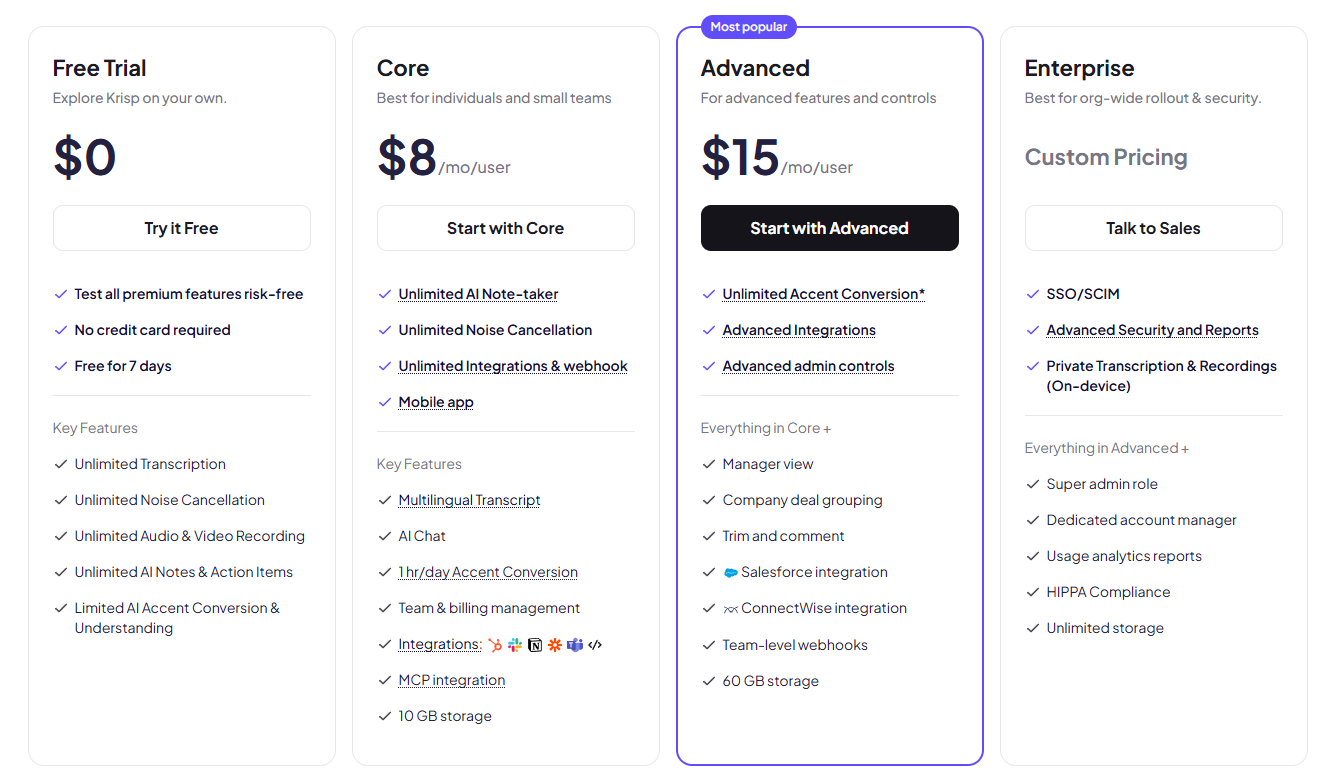
Krisp offers different subscription options depending on the product, user requirements, and available features.
For individual professionals, the AI Meeting Assistant provides a starting point for exploring its meeting productivity capabilities.
For users who need more advanced functionality, paid plans offer additional capabilities and usage options.
Krisp has also updated its subscription naming. Its previous Pro and Business plans were renamed Core and Advanced, respectively, according to its 2026 product update.
The available plans and features may change, so it is important to check the official pricing page before making a purchasing decision.
Understanding the Main Plan Options
Free or Trial Access
A free option or trial experience can be useful for people who want to understand the interface and evaluate whether Krisp fits their workflow.
It is a practical starting point if you are not ready to purchase a subscription.
Core Plan
The Core plan is designed for professionals who want access to important AI Meeting Assistant capabilities.
According to Krisp’s help documentation, Core supports meeting transcription and AI meeting notes.
It may be suitable for individuals who regularly participate in online meetings and want to reduce manual note-taking.
Advanced Plan
Advanced is intended for users and teams who need additional functionality beyond the standard Core experience.
Depending on the current subscription configuration, it may provide additional meeting management and collaboration capabilities.
Enterprise Solutions
Larger organizations may require centralized administration, security controls, deployment support, and customized workflows.
Krisp offers enterprise-oriented solutions for these requirements.
Is Krisp Worth Paying For?
The value of Krisp depends on how frequently you use it.
If you only attend one short meeting per month, paying for a premium subscription may not provide significant value.
However, if you participate in multiple meetings every day, the combination of noise cancellation, transcription, summaries, and action item extraction could save considerable time.
A simple way to evaluate the subscription is to compare its monthly cost with the time saved through automated meeting documentation.
For example, if you normally spend 10 minutes writing notes after each meeting and attend 20 meetings per month, you spend approximately 200 minutes on manual note-taking.
A tool that meaningfully reduces this workload may justify its subscription cost.
The actual savings will depend on your workflow and how much manual editing is still required.
Check the latest plans and choose the right option for your needs. View Krisp Pricing.
6. Krisp Pros and Cons
No software solution is perfect for everyone. Before deciding whether Krisp is the right choice, it is worth considering its main strengths and limitations.
Advantages of Krisp
1. Strong Focus on Audio Quality
Noise cancellation is one of Krisp’s core strengths. Its AI technology is designed to reduce unwanted background sounds and improve communication quality.
2. Combines Multiple Productivity Features
Instead of using separate applications for noise cancellation, meeting transcription, and AI summaries, users can access several capabilities within one ecosystem.
3. Works With Existing Meeting Applications
Krisp is designed to integrate into existing communication workflows, reducing the need to switch between different meeting platforms.
4. Automatic Meeting Documentation
AI-generated transcripts, notes, and action items can help users spend less time documenting conversations manually.
5. Useful for Remote Teams
Professionals working from home or shared offices may benefit from better audio quality and more organized meeting information.
6. Additional Voice AI Capabilities
Accent conversion and the wider voice AI product ecosystem make Krisp more than a conventional noise suppression application.
7. Flexible Use Cases
The platform can serve individuals, business teams, contact centers, and developers through different product offerings.
Disadvantages of Krisp
1. Some Features Require Paid Plans
Users who need advanced functionality may need to purchase a subscription.
2. Desktop Configuration May Require Attention
Setting up the correct microphone, speaker, and meeting application settings can take some initial effort.
3. AI Transcription Is Not Always Perfect
Speech recognition can produce errors, particularly when audio quality is poor or conversations involve complicated terminology.
4. Requires Device Resources
Real-time audio processing and recording may consume system resources, depending on the computer and configuration.
5. Different Products Serve Different Audiences
Krisp AI Meeting Assistant, Call Center AI, and developer solutions are separate product offerings. Users should select the correct solution instead of assuming every feature is included in one subscription.
6. Privacy and Recording Settings Matter
Although noise cancellation runs locally, meeting recording and transcription involve separate data processing considerations. Users should understand how their selected settings handle recordings and meeting information.
Overall Pros and Cons Verdict
Krisp offers an attractive combination of AI audio enhancement and meeting productivity features.
Its main appeal is convenience: improving audio quality while helping users capture and organize conversations.
However, it is important to select the right subscription and understand which features are included before committing to a paid plan.
Ready to see whether these benefits match your workflow? Explore Krisp AI.
7. Krisp vs. Other AI Meeting Assistants
The AI meeting assistant market includes several products that focus on recording, transcription, summaries, and meeting productivity.
Some tools prioritize automatic meeting notes, while others focus on audio enhancement or broader collaboration workflows.
Here is a general comparison of Krisp with several recognizable alternatives.
Krisp vs. Otter.ai
Otter.ai is known for its meeting transcription and AI-powered conversation documentation capabilities.
Its main appeal is helping users capture spoken discussions and turn them into searchable text and summaries.
Krisp offers a broader combination of voice-focused functionality, including noise cancellation, accent conversion, and AI meeting assistance.
If your main requirement is meeting transcription, Otter.ai is worth evaluating.
If you also want dedicated AI noise cancellation and voice enhancement, Krisp may be more suitable.
Krisp vs. Fireflies.ai
Fireflies.ai focuses on AI-powered meeting recording, transcription, summaries, and conversation analysis.
It is designed to help teams organize meeting information and review conversations.
Krisp differentiates itself through its emphasis on real-time audio enhancement and noise cancellation, alongside meeting productivity features.
Users should compare their respective recording workflows, integrations, and subscription limits before deciding.
Krisp vs. Fathom
Fathom is an AI meeting assistant designed to capture conversations, generate summaries, and help users review important meeting information.
Its appeal is simplicity and meeting documentation.
Krisp offers additional audio-focused capabilities, particularly for people who want noise cancellation alongside meeting notes and transcription.
Comparison Table
| Feature | Krisp | Otter.ai | Fireflies.ai | Fathom |
|---|---|---|---|---|
| AI noise cancellation | Yes | Not a core focus | Not a core focus | Not a core focus |
| Meeting transcription | Yes | Yes | Yes | Yes |
| AI meeting summaries | Yes | Yes | Yes | Yes |
| Action items | Yes | Yes | Yes | Yes |
| Accent conversion | Yes | Not a core focus | Not a core focus | Not a core focus |
| Meeting recording | Yes | Yes | Yes | Yes |
| Primary positioning | Voice AI and meetings | Transcription | Conversation intelligence | Meeting assistant |
The comparison above describes general product positioning rather than an exhaustive feature-by-feature plan comparison. Individual features, integrations, and limitations can change over time.
Which One Should You Choose?
Choose Krisp if you want a combination of noise cancellation, voice enhancement, and AI meeting assistance.
Consider Otter.ai if transcription and searchable meeting content are your primary priorities.
Consider Fireflies.ai if you want to explore meeting documentation and conversation intelligence workflows.
Consider Fathom if you prefer a meeting assistant centered on capturing conversations and generating useful summaries.
Ultimately, the best solution depends on your communication habits, technical requirements, and budget.
Want an all-in-one voice enhancement and meeting productivity solution? Give Krisp a try.
8. Is Krisp Safe? Privacy and Security Considerations
Privacy is an important consideration when using AI applications that process voice recordings and business conversations.
Krisp provides security and privacy information through its official documentation and Trust Center.
One important distinction is that its noise cancellation and meeting recording features handle audio differently.
According to Krisp, noise cancellation processing runs locally on the user’s device, meaning audio does not need to be sent to external servers for that particular processing function.
However, when recording or using the Note Taker features, Krisp may store audio, video or screen recordings, transcripts, and meeting notes to provide its services.
Its documentation also explains that audio data is encrypted in transit and at rest.
For transcript-only mode, processing can vary depending on language and settings. Some audio may be processed on-device, while other configurations may involve server-side transcription.
This means users should not assume that every Krisp feature operates entirely offline.
Before using Krisp for confidential business meetings, consider the following:
- Review the official privacy policy.
- Understand the selected recording mode.
- Check data retention settings.
- Obtain appropriate consent before recording.
- Follow your company’s data protection policies.
- Avoid recording sensitive discussions without authorization.
- Review applicable legal requirements in your jurisdiction.
Krisp also provides organizational security information, including details about its compliance and certifications.
For regulated industries, companies should independently verify whether the specific product, deployment, and configuration meet their compliance requirements.
Learn more about Krisp’s security and privacy approach. Visit the official Krisp website.
9. How to Get Started With Krisp AI
Getting started with Krisp is relatively straightforward.
You do not need to replace your existing video conferencing application to begin using its audio enhancement capabilities.
Here is a basic setup guide.
Step 1: Visit the Official Website
Open the Krisp website and navigate to the sign-up page.
You can review the available product information and choose the AI Meeting Assistant if your main goal is improving online meetings.
Step 2: Create Your Account
Register using an available sign-up method.
Follow the on-screen instructions to complete your account setup.
Step 3: Download and Install Krisp
Download the appropriate desktop application for your supported operating system.
Follow the installation instructions and open the application after installation.
Step 4: Configure Your Audio Devices
Open the Krisp application and enable the noise cancellation options you need.
Then open your preferred meeting application and select Krisp Microphone as the input device and Krisp Speaker as the output device.
This allows Krisp to process audio within the supported communication workflow.
Step 5: Enable AI Meeting Assistance
Open the Note Taker settings and choose your preferred recording mode.
You can select transcript-only, audio, or video options depending on your requirements and available configuration.
Step 6: Join a Meeting
Open Zoom, Google Meet, Microsoft Teams, or another supported communication application.
Start or join a meeting and verify that your Krisp audio settings are working correctly.
Step 7: Review Your Meeting Notes
After the meeting, open the Krisp dashboard to access available transcripts, summaries, and action items.
You can then review the generated information and share relevant details with your team when appropriate.
Following these steps should help most new users understand the basic workflow.
Ready to set up your account? Sign up for Krisp AI here.
10. Tips to Get the Most Out of Krisp
Using AI software effectively requires more than simply installing an application.
A few practical adjustments can help you get more value from Krisp.
Use a Good Microphone
Noise cancellation can improve audio quality, but it cannot completely compensate for every microphone limitation.
A reasonable headset or external microphone can provide a better starting point.
Test Your Audio Before Important Meetings
Do not wait until an important customer presentation to configure your audio devices.
Test your microphone, speaker, and noise cancellation settings beforehand.
Choose the Right Recording Mode
Not every meeting needs an audio or video recording.
For routine discussions, transcript-only recording may be sufficient.
For situations that require more context, consider the appropriate recording option while respecting participant consent.
Review AI-Generated Notes
AI-generated summaries are useful, but they should not automatically replace human review.
Check names, deadlines, figures, responsibilities, and important business decisions before distributing meeting notes.
Connect Relevant Productivity Tools
If your workflow depends on CRM or collaboration platforms, explore Krisp’s available integrations.
A well-configured workflow can reduce the amount of manual work required after meetings.
Manage Meeting Data Carefully
Review your retention and deletion preferences regularly, especially when working with confidential customer information.
Make your meeting workflow smarter with Krisp AI.
11. Frequently Asked Questions About Krisp AI
Below are answers to common questions people ask before choosing Krisp.
What is Krisp AI used for?
Krisp is an AI voice technology platform used to improve communication quality and meeting productivity.
Its AI Meeting Assistant offers features such as noise cancellation, transcription, meeting recordings, AI-generated notes, summaries, and accent conversion.
Is Krisp AI free?
Krisp offers free access or trial options depending on its current product and subscription structure.
Some features and advanced capabilities may require a paid subscription.
Check the official pricing page for the latest information.
Is Krisp worth paying for?
Krisp may be worth paying for if you frequently attend online meetings and need better audio quality, automatic transcripts, and meeting summaries.
Its value depends on your meeting frequency, workflow, and subscription requirements.
Does Krisp work with Zoom?
Yes. Krisp supports workflows involving Zoom.
Users can configure Krisp Microphone and Krisp Speaker within the Zoom audio settings.
Does Krisp work with Google Meet?
Yes. Krisp supports Google Meet workflows.
Users can configure their audio devices to use Krisp’s noise cancellation features.
Does Krisp work with Microsoft Teams?
Yes. Krisp supports Microsoft Teams and other compatible calling applications.
Does Krisp record meetings?
Yes. Krisp AI Meeting Assistant provides recording options.
Available modes include transcript-only, audio, and video, depending on the configuration.
Does Krisp automatically generate meeting summaries?
Yes. Its AI Meeting Assistant can generate meeting notes and summaries based on captured meeting content.
Can Krisp remove background voices?
Krisp offers voice isolation capabilities designed to reduce unwanted background human voices while preserving the primary speaker.
Does Krisp support accent conversion?
Yes. Krisp provides AI-powered accent conversion designed to improve speech clarity during communication.
Is Krisp safe for business meetings?
Krisp provides security and privacy documentation, including information about audio processing and data encryption.
However, businesses should review its privacy policies, data handling practices, recording settings, and compliance requirements before using it for confidential conversations.
Does Krisp require a separate meeting bot?
Krisp’s AI Meeting Assistant supports bot-free note-taking workflows.
Its product documentation also describes recording options and configurations that users can choose depending on their needs.
What are the best Krisp alternatives?
Some alternatives worth evaluating include Otter.ai, Fireflies.ai, and Fathom.
Each platform has different strengths, so the best choice depends on whether you prioritize transcription, meeting summaries, conversation intelligence, or audio enhancement.
Who should use Krisp?
Krisp may be useful for remote workers, entrepreneurs, sales professionals, consultants, educators, content creators, and teams that regularly communicate through online meetings.
Can Krisp improve customer communication?
Yes. Its noise cancellation and voice AI technologies are designed to improve communication clarity.
For larger customer service operations, Krisp also offers separate Call Center AI solutions.
Still have questions? Visit Krisp’s official website to explore the platform.
12. Final Verdict: Is Krisp AI Worth It in 2026?
After examining its features, functionality, potential applications, and limitations, Krisp stands out as an interesting solution for people who want to improve the quality and productivity of online communication.
Its biggest advantage is the combination of AI noise cancellation and meeting assistance.
Many productivity applications focus primarily on transcription and summaries. Krisp takes a broader approach by addressing audio quality while also helping users capture and organize meeting information.
For remote professionals, clearer audio can make everyday communication more comfortable.
For entrepreneurs and business owners, automatic meeting notes can help reduce administrative work.
For sales teams and consultants, searchable transcripts and action items can support more organized customer follow-ups.
For international teams, accent conversion offers another way to improve communication clarity.
Of course, Krisp is not necessarily the right choice for everyone.
People who rarely participate in online meetings may not need a paid subscription. Users who only require basic transcription may prefer a specialized alternative. Organizations with strict compliance requirements should carefully review the product’s data handling and deployment options.
However, if your daily workflow involves online meetings, customer calls, remote collaboration, or international communication, Krisp is worth evaluating.
Its combination of audio enhancement and AI meeting productivity makes it a compelling option in the growing voice AI market.
Our Recommendation
We recommend considering Krisp if you:
- Attend online meetings regularly.
- Work in a noisy environment.
- Want clearer microphone and speaker audio.
- Spend too much time writing meeting notes.
- Need searchable meeting transcripts.
- Want AI-generated summaries and action items.
- Work with international customers or colleagues.
- Want to improve your remote communication workflow.
The best way to determine whether Krisp fits your needs is to explore the product and test the available features with your own meeting setup.
Ready to improve your meetings and work more efficiently?
Try Krisp AI Today – Explore the Official Website
Affiliate Disclosure
This article contains affiliate links. If you purchase a subscription or sign up through certain links in this article, we may earn a commission at no additional cost to you.
Our goal is to provide useful information to help readers make informed decisions about software and productivity tools. We encourage readers to review the official product information, pricing, and terms before purchasing.
Posts same category:
Viktor AI Review (2026): Is This the AI Employee That Can Actually Replace Human Work?
Letterly Review 2026 – The AI Voice-to-Text App That Turns Your Thoughts Into Professional Content
MagicPost AI Review: The Complete Guide to Writing and Scheduling LinkedIn Content with AI
Krisp AI Review 2026: Features, Pricing, Pros & Cons – Is It Worth It?